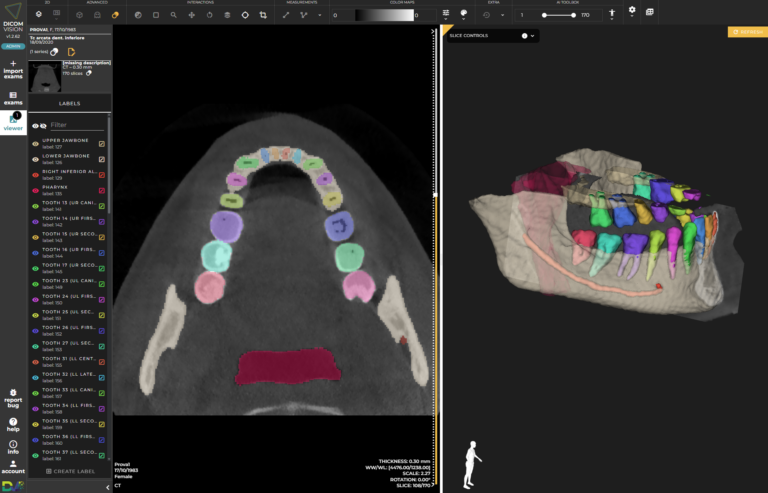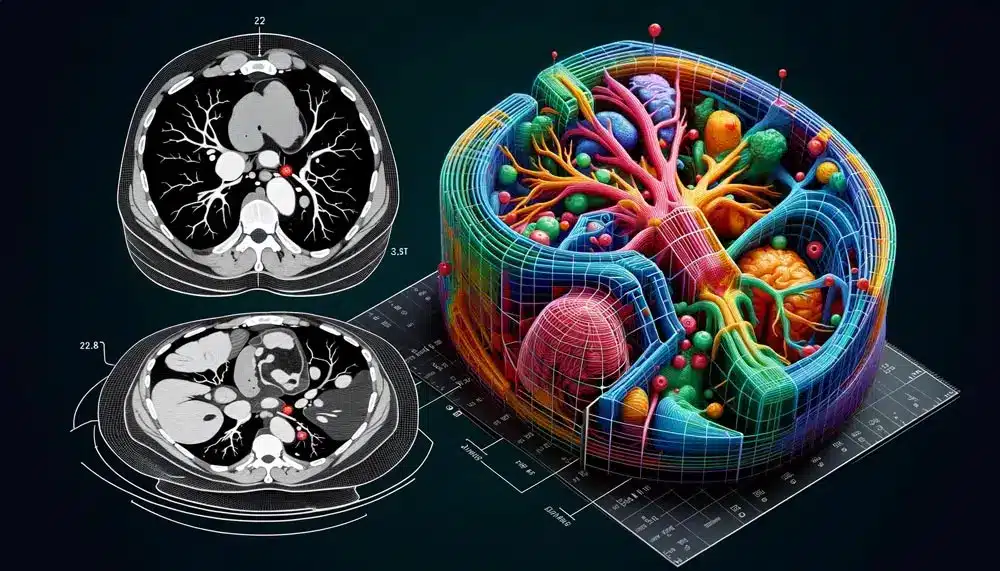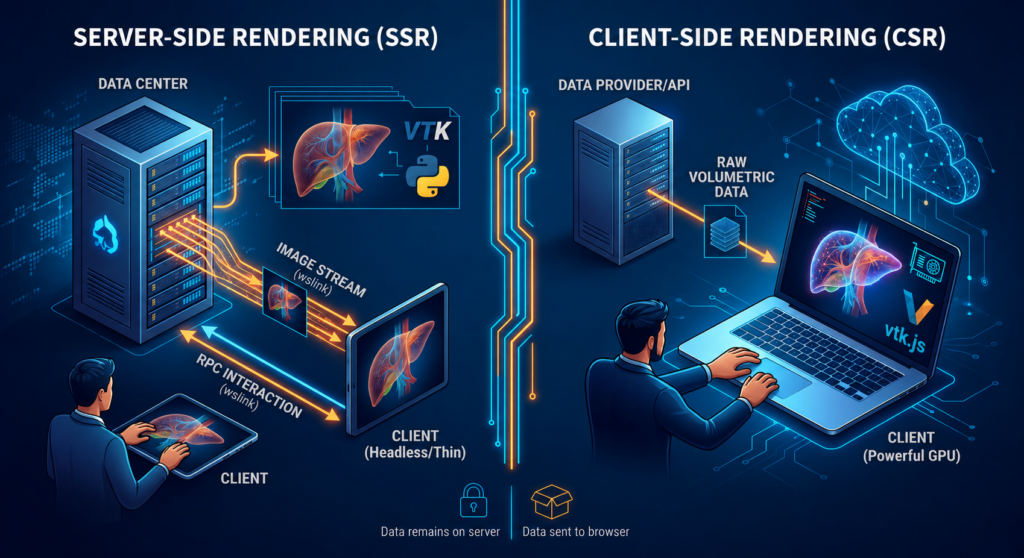

In this article, we will analyze the primary web-based 3D visualization architectures, comparing Server-Side Rendering (SSR) and Client-Side Rendering (CSR) models.
Security and Intellectual Property
- Server-Side Rendering (SSR): This model guarantees original data integrity and intellectual property (IP) protection. Because the entire volumetric dataset (e.g., NRRD or DICOM files) and the rendering code can reside exclusively on the server infrastructure, the end-user never gains access to the raw data. The client receives only encoded pixel streams, making it impossible to extract geometry or sensitive metadata from the frontend.
- Client-Side Rendering (CSR): In this scenario, the server acts as a static data provider or API. The complete dataset must be transferred over the network to the user’s browser. Although obfuscation techniques exist, binary data is inherently exposed in network traffic and client memory, increasing the risk of exfiltration or reverse engineering of the algorithm.
Hardware Abstraction and Accessibility
- Server-Side Rendering (SSR): The burden of graphics computation is delegated to the backend. The client only needs standard video decoding capability and a stable WebSocket connection. This enables visualization of massive datasets even on devices with limited or no GPU, such as tablets or legacy workstations, unifying the user experience regardless of local hardware.
- Client-Side Rendering (CSR): The smoothness of visualization is directly proportional to the computational power of the local GPU. The user must have hardware compatible with WebGL or WebGPU APIs. Large datasets can cause saturation of system RAM or video VRAM on the client, leading to browser instability or performance degradation (low FPS). Additionally, there is no full control over the hardware on which the rendering will run, forcing support for different technologies and peripherals (GPUs).
Architectural Paradigm and State Management
- Server-Side Rendering (SSR): It is a stateful architecture. The server maintains the instance of the VTK pipeline and the camera state for each active session. Every interaction command is a Remote Procedure Call (RPC) that updates the centralized state. This guarantees a “single source of truth” but requires complex management of persistent sessions.
- Client-Side Rendering (CSR): It is a tendentially stateless architecture from the server’s point of view. Once the data is downloaded, the client independently manages the scene state, camera, and geometric transformations. This reduces backend complexity, but can generate inconsistencies if multiple clients must collaborate on the same view in real time without an external synchronization mechanism.
4. Scalability and Infrastructure Costs
- Server-Side Rendering (SSR): Scalability is limited by the density of GPU and CPU instances that can be managed on the server. Each active user consumes dedicated hardware resources for OpenGL rendering within virtual displays. Operational costs (OpEx) scale linearly with the number of concurrent users, requiring cloud infrastructures equipped with graphics acceleration.
- Client-Side Rendering (CSR): Offers near-infinite scalability at reduced infrastructure costs. Because the rendering workload is distributed across users’ devices, the server only needs to handle file transfers. The cost for the service provider remains low even with exponential user growth, effectively shifting the hardware investment to the end-user.
5.Technical Implementation of 3D Visualization Architectures
SSR Implementation
The system we have implemented internally utilizes a graphics virtualization approach via Xvfb to create a virtual display (e.g., DISPLAY=:1) where VTK performs headless rendering.
- Backend: The Python logic initializes the renderer and the wslink protocols. The vtkWebPublishImageDelivery protocol is responsible for capturing frames and transmitting them as binary data via WebSockets.
- Interaction: Mouse events captured in the browser via vtkRemoteView are sent as RPC messages to the server, which updates the VTK camera and generates a new frame. Network latency directly affects the response time between user input and the visual update.
CSR Implementation
In a purely client-side architecture, the implementation follows a different workflow:
- Data Loading: The browser issues GET requests to fetch the volumetric data (e.g., NRRD or DICOM datasets). To optimize data transfer, datasets are often compressed or chunked into sub-volumes (volumetric streaming).
- Client Pipeline: A library such as vtk.js is used to instantiate the rendering pipeline directly within the browser. The data is loaded into the browser’s memory and decoded (frequently utilizing WebAssembly to maximize performance).
- Local Rendering: The library initializes a local WebGL or WebGPU context. Pixel computation, transfer function mapping (color and opacity), and ray-casting are executed in real time directly on the user’s GPU.
Interaction: Since both the geometry and the renderer reside locally, interaction is immediate and decoupled from network latency, ensuring an instantaneous response to rotation or zoom commands.
To further explore the implementation details, a step-by-step technical guide for a vtk / vtk.js-based Server-Side Rendering (SSR) system is provided below.
Phase 1: Headless Environment Configuration and Containerization
To execute graphical rendering on the server without a physical monitor, the runtime environment must be configured in headless mode, emulating a graphical display server entirely in memory.
1. System Dependencies Installation: The container image must bundle X11 utilities, virtual OpenGL drivers (mesa-utils, xvfb), the VTK Python framework, and the Node.js runtime environment for managing frontend dependencies.
					# Estratto dal setup dell'ambiente di sistema
RUN apt update && apt install -y mesa-utils xvfb && pip install vtk==9.1.0 && \
    curl -fsSL https://deb.nodesource.com/setup_16.x | bash - && \
    apt-get install -y nodejs
2. Virtual Framebuffer Initialization: Before launching any graphical processes, a dummy display must be allocated in the background using Xvfb.
					# Start virtual fb server sul display :1
Xvfb :1 &
Phase 2: Rendering Server Implementation (Python Backend)
The backend manages the 3D computation pipeline and is responsible for exposing the WebSocket endpoint for frame streaming and remote command handling.1. Communication Protocol Extension: A custom class is defined by subclassing vtk_wslink.ServerProtocol to centralize session logic and configure the network interface.
					class _WebCone(vtk_wslink.ServerProtocol):
    view = None
    authKey = "wslink-secret"

    def initialize(self):
        global renderer, renderWindow, renderWindowInteractor, cone, mapper, actor
2. VTK Web Module Registration and Optimization: Within the session initialization, native protocols for mouse interaction, viewport management, and image delivery are registered, while disabling native C++-side encoding to maximize throughput.
					# Registrazione dei protocolli di interazione e streaming
        self.registerVtkWebProtocol(protocols.vtkWebMouseHandler())
        self.registerVtkWebProtocol(protocols.vtkWebViewPort())
        self.registerVtkWebProtocol(protocols.vtkWebPublishImageDelivery(decode=False))
        self.registerVtkWebProtocol(protocols.vtkWebViewPortGeometryDelivery())

        # Aggiornamento chiave di autenticazione e ottimizzazione encoding
        self.updateSecret(_WebCone.authKey)
        self.getApplication().SetImageEncoding(0)
3. Pipeline Construction and View Mapping: If the view is not present, the core VTK objects (vtkRenderer, vtkRenderWindow), are instantiated, the geometry is configured (a cone, in this case), and the render window is mapped to the global active objects registry under the "VIEW" key.
					if not _WebCone.view:
            renderer = vtk.vtkRenderer()
            renderWindow = vtk.vtkRenderWindow()
            renderWindow.AddRenderer(renderer)

            renderWindowInteractor = vtk.vtkRenderWindowInteractor()
            renderWindowInteractor.SetRenderWindow(renderWindow)
            renderWindowInteractor.GetInteractorStyle().SetCurrentStyleToTrackballCamera()

            cone = vtk.vtkConeSource()
            mapper = vtk.vtkPolyDataMapper()
            actor = vtk.vtkActor()

            mapper.SetInputConnection(cone.GetOutputPort())
            actor.SetMapper(mapper)
            renderer.AddActor(actor)

            renderer.ResetCamera()
            renderWindow.Render()

            # Registrazione della finestra di rendering per il modulo web
            _WebCone.view = renderWindow
            self.getApplication().GetObjectIdMap().SetActiveObject("VIEW", renderWindow)
4. Web Server Initialization: At the application’s entry point, command-line arguments are parsed to configure the network ports and spin up the persistent network server.
					if __name__ == "__main__":
    parser = argparse.ArgumentParser(description="VTK/Web Cone web-application")
    server.add_arguments(parser)
    args = parser.parse_args()

    _WebCone.authKey = args.authKey
    server.start_webserver(options=args, protocol=_WebCone)
Phase 3: Visualization Client Implementation (JavaScript Frontend)
The web client connects to the WebSocket server, allocates a viewport within the DOM, and routes user inputs back to the backend.
1. Client Module Initialization: The necessary vtk.js and wslink constructors are extracted to manage data streaming and the remote view.
					const vtkWSLinkClient = vtk.IO.Core.vtkWSLinkClient;
const vtkRemoteView = vtk.Rendering.Misc.vtkRemoteView;
const connectImageStream = vtk.Rendering.Misc.vtkRemoteView.connectImageStream;
const SmartConnect = wslink.SmartConnect;

vtkWSLinkClient.setSmartConnectClass(SmartConnect);
2. vtkRemoteView Configuration: The remote viewport is instantiated by defining the RPC event mapped to the mouse scroll wheel and setting the parameters for interactive JPEG compression.
					const view = vtkRemoteView.newInstance({
  rpcWheelEvent: "viewport.mouse.zoom.wheel"
});
view.setContainer(divRenderer);
view.setInteractiveRatio(0.7); // Scala di risoluzione durante il movimento
view.setInteractiveQuality(50); // Qualità JPEG durante l'interazione
3. WebSocket Tunnel Establishment: The connection configuration object is defined. Upon completion of the handshake workflow, the image stream is bound to the active session.
					const clientToConnect = vtkWSLinkClient.newInstance();
const config = {
  application: "cone",
  sessionURL: "ws://" + window.location.hostname + ":8765/ws"
};

clientToConnect
  .connect(config)
  .then(validClient => {
    // Abilita la ricezione del flusso binario delle immagini
    connectImageStream(validClient.getConnection().getSession());

    const session = validClient.getConnection().getSession();
    view.setSession(session);
    view.setViewId(-1); // Richiede la vista attiva registrata come di default
    view.render();
  })
  .catch(error => {
    console.error(error);
  });
Phase 4: Process Orchestration and Execution
The final phase involves the coordination and execution of the software processes on the server.
1. Virtual Display-Bound Execution: The Python rendering server must be started by prefixing the DISPLAY=:1, environment variable, thereby routing the OpenGL graphical contexts to the previously created Xvfb framebuffer.
					# Avvio del server SSR in background vincolato al display virtuale
DISPLAY=:1 python3 /app/vtk_server.py --port 4321 --host 0.0.0.0 &
SERV_PID=$!
sleep 3
2. Frontend Deployment: In parallel with the backend, the client’s static assets (HTML, JavaScript bundles) are served via a standard HTTP server to enable access from remote browsers.
					# Avvio del server HTTP per la distribuzione del client web
cd /app/frontend
python3 -m http.server
Conclusion
In summary, selecting the optimal architecture for advanced 3D visualization is not merely a matter of technological preference, but a strategic trade-off among binding security, infrastructure, and performance requirements. The two paradigms address diametrically opposed operational needs
When to Implement Server-Side Rendering (SSR)
The approach based on VTK and wslink proves to be the optimal choice in the following scenarios:
– Stringent Security Constraints (Zero-Data-Leak): Regulated medical or industrial environments (e.g., HIPAA compliance or the protection of industrial CAD patents) where transferring original binary files outside the data center’s perimeter is either prohibited or highly risky. With SSR, data exposure is strictly limited to the pixels of the video stream.
– Massive Datasets and High Volumetric Density: Visualization of data that exceeds the allocation capacities of RAM and VRAM typically found on consumer devices. The server-side processing pipeline enables the computation of complex geometries and heavy volumetric rendering directly within the backend infrastructure’s memory.
– Client Device Heterogeneity (Hardware Abstraction): The need to deploy the application to a broad user base equipped with thin clients, mobile devices, or legacy workstations lacking local hardware acceleration compatible with WebGL/WebGPU.
When to Implement Client-Side Rendering (CSR)
The decentralized architecture based on frontend libraries such as vtk.js is preferred in the following contexts:
– Low-Cost Mass Scalability: Applications targeted at thousands of concurrent users, where the cost of maintaining a server farm equipped with dedicated GPUs (required for headless rendering and multiple Xvfb instances) would be financially unsustainable. CSR distributes the computational burden directly onto the end-users’ hardware.
– Low-Latency, Real-Time Interaction: Systems where an immediate response to user input (rotation, filter manipulation, multi-frame navigation) is a critical requirement for the user experience (UX). By executing pixel computation locally on the client’s GPU, the network latency bottleneck associated with bidirectional RPC calls is eliminated.
– Intermittent Connection Availability: Scenarios where the client must be able to continue manipulating the 3D scene even under unstable or absent network connectivity conditions, a situation that cannot be supported by the strictly stateful model of SSR.
In conclusion, the ideal architecture might ultimately take the form of a hybrid model: leveraging CSR for rapid exploration and routine diagnostics on standard datasets, paired with dedicated SSR sessions for the advanced analysis of large data volumes or for processing protected by high confidentiality standards.