
Stop Scripting Your Setup: Why You Should Try Nix Home Manager
We have all been there. You get a fresh laptop, or maybe you finally decide to wipe your current machine to start over. The first hour feels great, but then the reality sets in: you have to configure everything again.
Even if you are organized, it is a pain. You might have a repository of dotfiles and a few shell scripts you wrote three years ago to bootstrap your environment. You run them, and they mostly work. But then you start noticing the cracks. It doesn’t feel exactly like your other machine.
Maybe you start working and realize you are missing a specific config file for a tool you rarely touch but desperately need. Or perhaps you spent hours months ago researching an obscure flag to make a CLI utility behave a certain way, and now that setting is gone. Your muscle memory betrays you because your keyboard shortcuts aren’t quite right.
Then there is the issue of secrets. You can’t exactly check your SSH keys or API tokens into a public GitHub repository. So you end up manually copying files from a USB drive breaking any hope of full automation.
The problem gets worse if you juggle multiple machines, like a corporate MacBook for work and a Linux desktop at home. Keeping them in sync is a full-time job. Even if you manage to copy the config files, the underlying software might be different. You might have ripgrep version 13 on one machine and version 11 on the other, and you don’t realize the syntax has changed until your scripts fail.
There is a better way
This is usually where people talk about Nix and NixOS. If you haven’t heard of Nix, it’s a package manager and language that focuses on reproducibility. NixOS is a Linux distribution built entirely around this concept.
But here is the thing: you don’t need to switch your operating system to NixOS to solve these problems.
If you are on a company-issued MacBook, you obviously can’t install a new OS. If you are on Ubuntu and don’t want to reinstall everything, that’s fine too. You can install the Nix package manager on any Linux distro or macOS.
Once you have Nix, you can use Home Manager.
Home Manager allows you to manage your user environment using the Nix language. Instead of running imperative commands (like apt install, brew install, or manually edit text files), you describe the state you want your machine to be in.
You write a single configuration file that says “I want these programs installed,” “I want Git configured with this email and these aliases,” and “I want my shell to look like this.”
Why it solves the headache
When you use Home Manager, your environment becomes portable code. You can apply that configuration to a new machine, and it will pull down exactly what you specified.
Syncing is automatic. Because the configuration is text, you can version control it. When you make a change to your vim configuration on your personal machine, you push it to your repo. When you get to work, you pull the repo, run the Home Manager switch command, and your work machine is instantly updated to match.
No more version mismatches. Nix allows you to pin packages to specific commits. If you need a specific version of Node.js or Python to make your workflow function, you declare it. Home Manager ensures that exact version is installed, regardless of what the underlying operating system thinks is “current.”
Safe experimentation One of the best features is the ability to roll back. Let’s say you decide to try out a totally different shell configuration or a new terminal emulator. You change your config and switch. If you hate it, you don’t have to spend hours undoing your mess. You just switch into the previous status and your system is exactly how it was five minutes ago.
Il valore strategico: accelerare la ricerca
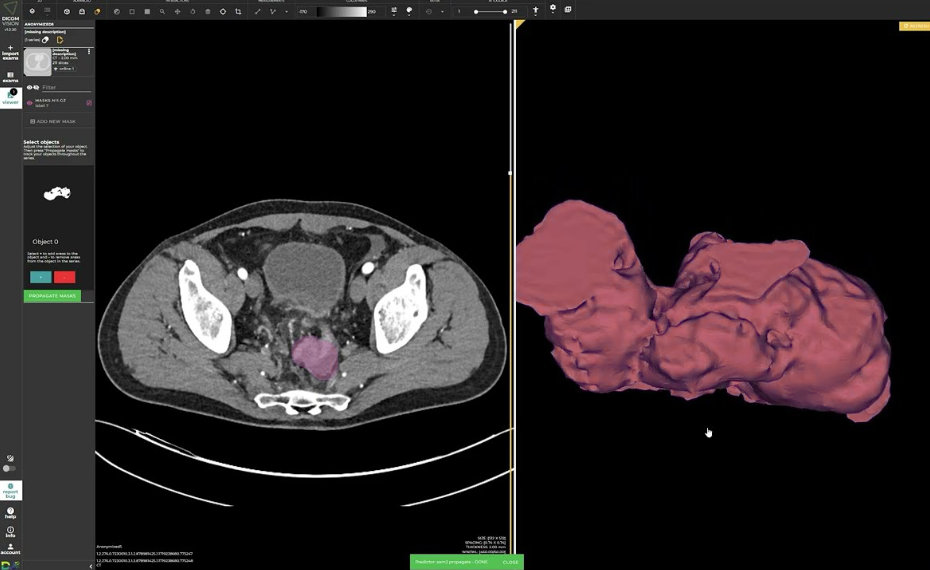
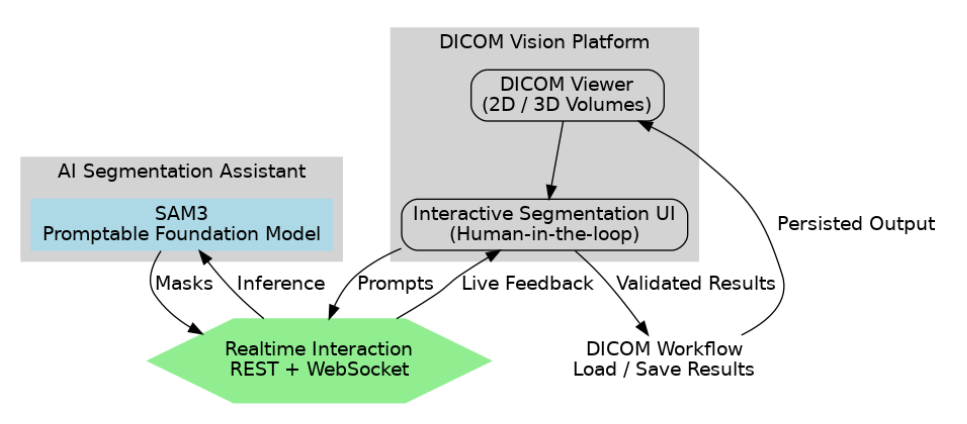
Anche in questa prima fase, l’integrazione di SAM3 in DICOM Vision ha dimostrato benefici evidenti, soprattutto per i ricercatori in radiologia.
Il loro obiettivo principale è spesso la creazione di ground truth di qualità per addestrare modelli AI futuri.
🎯 Benefici chiave:
Riduzione della frizione: partendo da input minimi, il ricercatore si concentra sulla validazione, non sul disegno manuale pixel per pixel
Cicli più veloci: SAM3 accelera la generazione di dataset, riducendo i tempi tra raccolta, training e valutazione
Conclusione: il modello è l’interfaccia
Dalle prime integrazioni emerge una verità chiave:
I foundation model generano valore quando aumentano il lavoro dell’esperto, non quando tentano di sostituirlo.
In D/Vision Lab, vediamo modelli come SAM3 non come soluzioni end-to-end, ma come interfacce intelligenti.
Nel medical imaging, l’innovazione non viene solo dall’architettura del modello, ma dalla progettazione dell’integrazione, nel rispetto dei vincoli clinici e della collaborazione umana.